
Download fpPS4 Temmie's Launcher – PS4 emulator, game launcher, Windows, easy setup, customizable library, visual options
Overview
fpPS4 Temmie's Launcher is a specialized utility application designed to streamline the experience of using the fpPS4 emulator on Windows systems. Its primary purpose is to simplify the setup and management of PS4 emulation, enabling users to launch and organize their favorite PlayStation 4 titles with minimal technical effort. The app is particularly beneficial for emulation enthusiasts and PC gamers seeking to relive PS4 gaming experiences without dedicated hardware. By acting as a companion tool to the fpPS4 emulator, it removes the complexity often associated with configuration, making it accessible even to users with limited technical knowledge.
Target users include hobbyists, retro gaming fans, and developers testing PS4-compatible content. The launcher solves the common pain point of manual emulator configuration by requiring only that the emulator be placed in the same directory, eliminating the need for path settings or advanced system adjustments. This approach ensures a frictionless entry into emulation, reducing setup time and potential errors. Real-world use cases include organizing a personal game library, testing game compatibility, or enjoying PS4 titles on a PC for convenience or accessibility.
The developer, Temmie, has positioned this tool as a lightweight, focused solution within the broader emulation ecosystem. While no additional details about the developer’s background were provided, the app’s design reflects a clear understanding of user needs in the niche but active emulation community. Its release date of April 26, 2024, marks a recent addition to the Windows utility landscape, offering a modern, user-centric alternative to more complex emulation frontends.
Key Features & Functionality
- Easy Setup – Installation requires no configuration. Users simply place the fpPS4 emulator in the same folder as the launcher and launch the executable. This eliminates the need for manual path inputs or registry edits, significantly reducing the barrier to entry for new users.
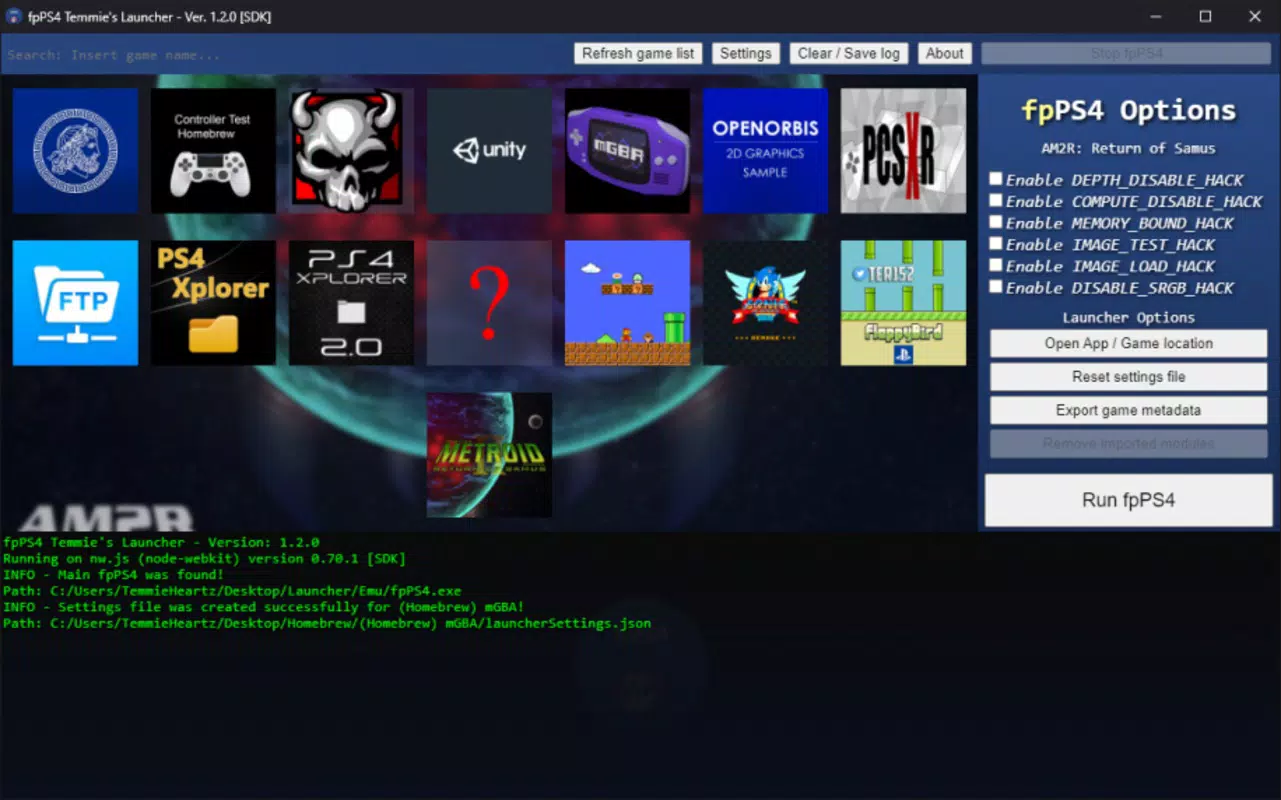
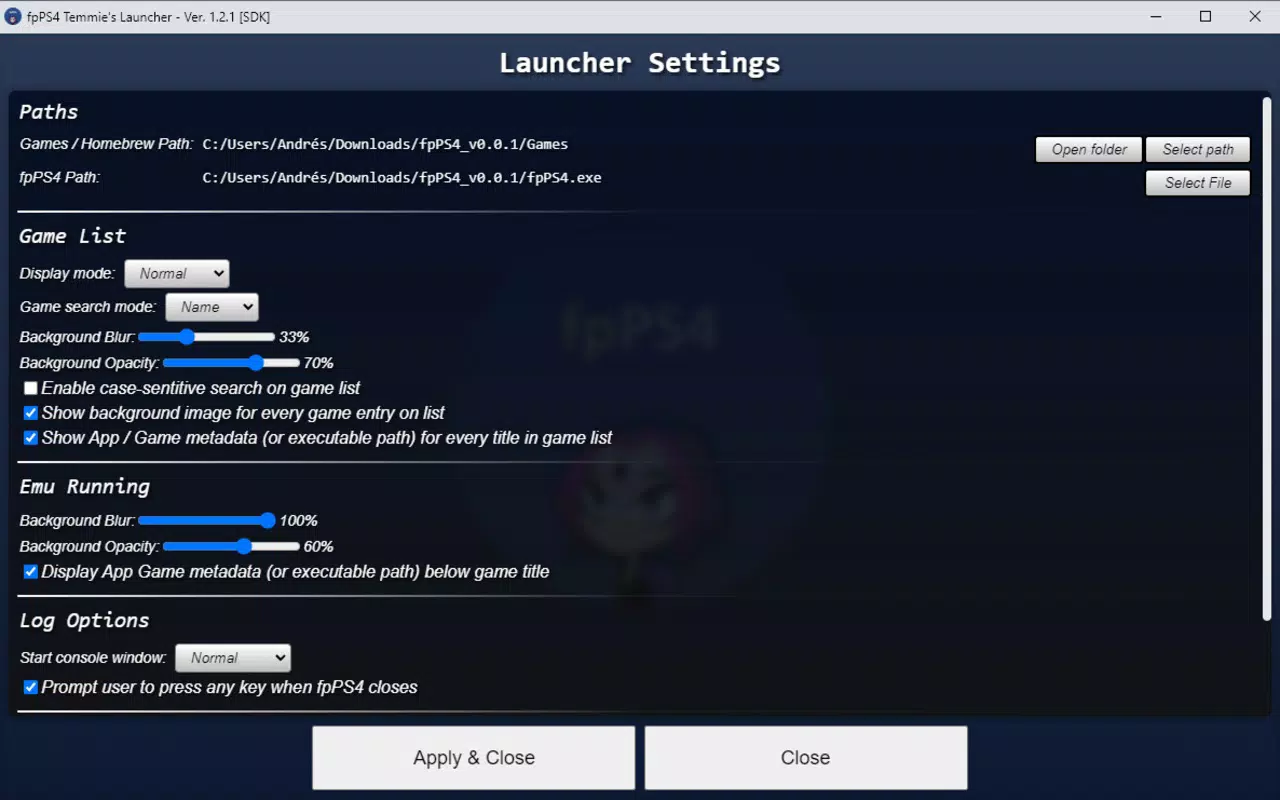
- Customizable Game Library – The launcher allows users to define the storage locations for both the emulator and their game files. This flexibility supports personalized organization, enabling users to manage large libraries across multiple drives or folders.
- Visual Customization Options – Users can modify the appearance of the game list and apply a blur effect to the background. These features enhance the visual appeal and create a more immersive experience, especially when used with high-resolution game covers.
- Emulator Integration – As a companion tool, the launcher does not function independently. It relies entirely on the fpPS4 emulator’s presence and compatibility. This dependency ensures seamless integration but requires users to maintain an updated emulator version for optimal performance.
- Streamlined Launch Workflow – The interface enables one-click game launching after initial setup. This efficiency is ideal for users who frequently switch between titles, minimizing downtime and enhancing the overall gaming flow.
For example, a user with a 500GB collection of PS4 ISOs can organize them into a dedicated folder, point the launcher to that directory, and immediately begin browsing and launching games. The visual customization options allow them to personalize the interface, turning the launcher into a tailored gaming dashboard.
Interface, UX & Performance
The interface of fpPS4 Temmie's Launcher is designed with simplicity and clarity in mind. It features a clean, minimal layout that prioritizes functionality over ornamentation. Navigation is straightforward, with a central game list displayed in a grid or list format, depending on user preference. The visual design emphasizes readability, with clear text labels and intuitive icons for common actions such as launch, settings, and library management.
Users can adjust the background blur effect and game list appearance, which contributes to a polished and immersive experience. The launcher responds promptly to user input, with minimal lag during navigation and game selection. Although the developer did not list formal performance metrics, the app’s lightweight footprint of 25.6 MB suggests efficient resource usage, making it suitable for systems with modest specifications.
Stability appears consistent based on its release as a mature version (1.0.0). The app maintains responsiveness across different screen sizes and resolutions, ensuring usability on both standard monitors and high-DPI displays. The lack of reported crashes or bugs in the provided documentation indicates a reliable user experience. However, performance may vary depending on the emulator version and system configuration, as the launcher itself does not handle emulation tasks.
Platform Compatibility & Technical Requirements
fpPS4 Temmie's Launcher is designed exclusively for the Windows platform. It is compatible with Windows operating systems, though specific version requirements were not listed by the developer. The application has a file size of 25.6 MB, which is compact and suitable for quick downloads and installations.
As a companion tool, it requires the fpPS4 emulator to be installed in the same directory. This dependency is critical for proper functionality and ensures that the launcher can locate and initiate the emulator seamlessly. The developer did not specify minimum OS requirements, so users should ensure their system meets the emulator’s needs. Compatibility with older or newer Windows versions cannot be confirmed without additional information.
Pros and Cons
- Simple, one-click setup with no configuration needed
- Lightweight at just 25.6 MB
- Supports customizable game library organization
- Offers visual personalization options like background blur
- Designed specifically for fpPS4 emulator, ensuring compatibility
- Requires the fpPS4 emulator to be present in the same folder
- Not a standalone emulator; dependent on external software
- Compatibility may vary based on emulator version
- Platform limited to Windows only
- Developer did not provide detailed technical requirements
FAQ
Is fpPS4 Temmie's Launcher free to download?
Yes, the app is available at no cost. It is distributed as a free utility for Windows users.
Can I use this launcher on macOS or Linux?
Currently, the launcher is only compatible with Windows. There is no official support for macOS or Linux systems.
Do I need to install the fpPS4 emulator separately?
Yes, the launcher functions as a companion tool and requires the fpPS4 emulator to be installed in the same folder. It does not include the emulator.
Is the launcher safe to use?
As a lightweight utility with no known security issues, the launcher is considered safe when downloaded from trusted sources. Always ensure the emulator and launcher are obtained from official or verified channels.
How do I update the launcher?
Updates are typically released by the developer, Temmie, through official channels. Users should check the developer’s website or repository for the latest version.
Final Thoughts
fpPS4 Temmie's Launcher stands out as a focused, efficient solution for users seeking a hassle-free way to enjoy PS4 emulation on Windows. Its intuitive design, minimal setup, and visual customization options make it a valuable addition to any emulation setup. While it is not a standalone emulator, its role as a streamlined frontend significantly enhances usability and accessibility.
It is particularly well-suited for casual gamers, emulation hobbyists, and those who value a clean, organized gaming experience. The app delivers strong value with zero cost, a compact size, and a clear purpose. For anyone using the fpPS4 emulator, this launcher removes the friction that often deters newcomers.
Download fpPS4 Temmie's Launcher now


